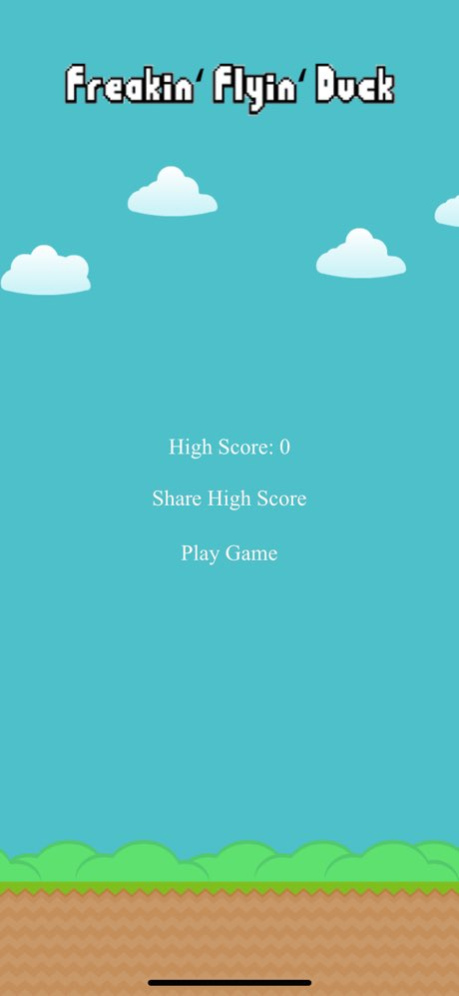
About Freakin' Flyin' Duck
Freakin' Flyin' Duck is a fun and addictive game that is good for the whole family. Don't get hit by the obstacles or it's game over. This game has amazing graphics and a wonderful selection of sound effects that will...
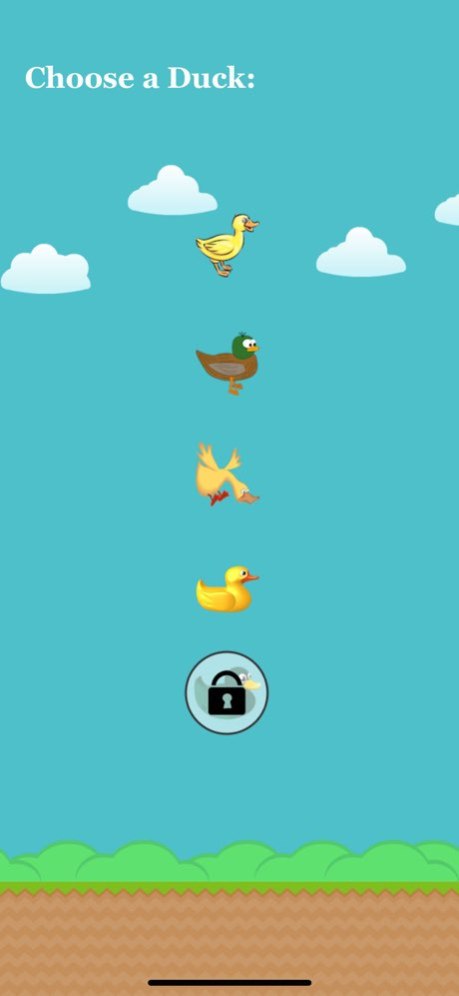
Freakin' Flyin' Duck is a fun and addictive game that is good for the whole family. Don't get hit by the obstacles or it's game over. This game has amazing graphics and a wonderful selection of sound effects that will make you smile with delight. Freakin' Flyin' Duck also features 4 different ducks to choose from (more ducks coming soon) and 1 exclusive duck which is unlockable when you earn a high score of 100 points. Freakin' Flyin' Duck also gives you the choice between 3 obstacles and 2 backgrounds when playing the game. I guarantee that you will love Freakin' Flyin' Duck! **How to use the Freakin' Flyin' Duck Apple Watch Remote app to control Gameplay: Step 1 - On the Main Menu Screen of the Game on the iPhone tap on the "Play Game" button. Step 2 - Choose a Duck by tapping on any of them on the iPhone. Step 3 - Choose an Obstacle by tapping on any of them on the iPhone. Step 4 - Choose a Background by tapping on any of them on the iPhone. Step 5 - Now on the Freakin' Flyin' Duck Apple Watch Remote app Force Touch on the Apple Watch screen to select the "Record Gameplay" button if you would like to record Gameplay. Step 6 - Tap the Apple Watch screen to start the Gameplay. Keep tapping the Apple Watch screen to control the duck on the iPhone during Gameplay. **Please Note: The Apple Watch App works once you're on the Gameplay Screen on the iPhone.
Previous Versions
Here you can find the changelog of Freakin' Flyin' Duck since it was posted on our website on 2021-12-17 14:18:14.
The latest version is 3.1.1 and it was updated on 2026-10-07 03:10:53. See below the changes in each version.
Freakin' Flyin' Duck version 3.1.1
Updated At: 2026-10-06
Changes: Version History This app has been updated by Apple to prepare for watchOS 27 compatibility. No new features are included.
> > UI Improvements 3.1.1 09/26/2024 > > Widget Updates and UI Improvements 3.1 09/12/2022 > > UI Improvements for the iOS Widget 3.0.2 07/17/2021 > > Widget UI Improvements 3.0.1 11/15/2020 > > Updated Splash Screen to reflect the new Galactic Duck Studios company name.
> > Support for iOS 14 Widgets
*Please note: Widget may take a couple of minutes or so to periodically update to display your new High Score on the Devices home screen. 3.0 09/19/2020 > > Bug Fixes and UI Improvements
> > New iMessage Stickers added
> > The iMessage Sticker Pack has been renamed to "Freakin' Duck Stickers" 2.10 07/22/2019 > > The game has been updated to support iOS 12.1.
> > UI Improvements
*Please Note: This update and all future updates will require iOS 12.1. Update your device to iOS 12.1 or higher to keep receiving updates on what new features Freakin' Flyin' Duck has to offer. 2.9 11/10/2018 > > Added support for iOS 12 and watchOS 5 with UI Improvements. 2.8.5 09/24/2018 > > Improvements and Bug Fixes
*Please note: This update and all future software updates to Freakin' Flyin' Duck will only support iOS 11 and above.
To continue to receive all of our new features and improvements in our software updates, please update your iOS device to iOS 11. 2.8.4 06/12/2018 > > Bug Fixes and Improvements 2.8.3 04/01/2018 > > Bug Fixes and Improvements 2.8.2 01/04/2018 > > Added a new iMessage sticker. 2.8.1 10/30/2017 > > Added support for iOS 11 2.8 09/28/2017 > > New Background Gameplay Music.
> > Design Improvements to the High Score Widget in Notification Center. 2.7 08/13/2017 > > Bug Fixes and Improvements 2.6.1 07/24/2017 > > *Now when you earn a score of 100 points you can gain access to an exclusive App Icon change for your home screen.
> > You now have the ability to review and rate the game using Apple's new iOS 10.3 app review and rating system.
*The exclusive App Icon change feature is currently only available to the iPhone. Support is coming soon to the iPad. 2.6 03/29/2017 **The Gameplay Screen Recording Update**
> > Added the ability to screen record your Freakin' Flyin' Duck gameplay to share with your friends and family. 2.5 02/06/2017 > > Your iOS Device now vibrates when you crash into the obstacles. 2.4.1 09/22/2016 > > New Splash Screen
> > Added iPad support
> > The game now offers iOS 10 iMessage Stickers. 2.4 09/13/2016 > > The game now supports optional local notification gameplay reminders.
> > Bug fixes for gameplay sound when using the Apple Watch Remote App
**Please Note: Freakin' Flyin' Duck Local Notifications can be turned off in settings. 2.3 05/27/2016 > > The Freakin' Flyin' Duck High Score Companion App has been discontinued. But we're not ending support on the Apple Watch. We are happy to introduce the Freakin' Flyin' Duck Remote App. You can now control your Freakin' Flyin' Duck gameplay right from your wrist. Choose an obstacle, Choose a background, and choose your duck. After your done choosing your gameplay on your iOS Device, grab your Apple Watch and begin playing the game.
*Please Note: The Freakin' Flyin' Duck Remote App requires WatchOS 2 or later to play. 2.2 05/01/2016 > > Brand new Freakin' Flyin' Duck Apple Watch companion app icon 2.1.5 03/20/2016 > > No more ads! iAds have been removed due to the iAd App Network discontinuation.
> > Notification Center High Score widget has been renamed to FFD Status.
> > Added the ability to launch the game using the URL Scheme, ffd:// 2.1.4 02/24/2016 > > App Now Supports 3D Touch Quick Actions on the iPhone 6s and 6s Plus.
Share your high score by 3D touching the app on your iOS home screen. 2.1.3 10/22/2015 > > Brand new background music
> > Brand new icon 2.1.2 06/20/2015
Freakin' Flyin' Duck version 3.1.1
Updated At: 2026-08-23
Changes: Version History > > UI Improvements 3.1.1 09/26/2024 > > Widget Updates and UI Improvements 3.1 09/12/2022 > > UI Improvements for the iOS Widget 3.0.2 07/17/2021 > > Widget UI Improvements 3.0.1 11/15/2020 > > Updated Splash Screen to reflect the new Galactic Duck Studios company name.
> > Support for iOS 14 Widgets
*Please note: Widget may take a couple of minutes or so to periodically update to display your new High Score on the Devices home screen. 3.0 09/19/2020 > > Bug Fixes and UI Improvements
> > New iMessage Stickers added
> > The iMessage Sticker Pack has been renamed to "Freakin' Duck Stickers" 2.10 07/22/2019 > > The game has been updated to support iOS 12.1.
> > UI Improvements
*Please Note: This update and all future updates will require iOS 12.1. Update your device to iOS 12.1 or higher to keep receiving updates on what new features Freakin' Flyin' Duck has to offer. 2.9 11/10/2018 > > Added support for iOS 12 and watchOS 5 with UI Improvements. 2.8.5 09/24/2018 > > Improvements and Bug Fixes
*Please note: This update and all future software updates to Freakin' Flyin' Duck will only support iOS 11 and above.
To continue to receive all of our new features and improvements in our software updates, please update your iOS device to iOS 11. 2.8.4 06/12/2018 > > Bug Fixes and Improvements 2.8.3 04/01/2018 > > Bug Fixes and Improvements 2.8.2 01/04/2018 > > Added a new iMessage sticker. 2.8.1 10/30/2017 > > Added support for iOS 11 2.8 09/28/2017 > > New Background Gameplay Music.
> > Design Improvements to the High Score Widget in Notification Center. 2.7 08/13/2017 > > Bug Fixes and Improvements 2.6.1 07/24/2017 > > *Now when you earn a score of 100 points you can gain access to an exclusive App Icon change for your home screen.
> > You now have the ability to review and rate the game using Apple's new iOS 10.3 app review and rating system.
*The exclusive App Icon change feature is currently only available to the iPhone. Support is coming soon to the iPad. 2.6 03/29/2017 **The Gameplay Screen Recording Update**
> > Added the ability to screen record your Freakin' Flyin' Duck gameplay to share with your friends and family. 2.5 02/06/2017 > > Your iOS Device now vibrates when you crash into the obstacles. 2.4.1 09/22/2016 > > New Splash Screen
> > Added iPad support
> > The game now offers iOS 10 iMessage Stickers. 2.4 09/13/2016 > > The game now supports optional local notification gameplay reminders.
> > Bug fixes for gameplay sound when using the Apple Watch Remote App
**Please Note: Freakin' Flyin' Duck Local Notifications can be turned off in settings. 2.3 05/27/2016 > > The Freakin' Flyin' Duck High Score Companion App has been discontinued. But we're not ending support on the Apple Watch. We are happy to introduce the Freakin' Flyin' Duck Remote App. You can now control your Freakin' Flyin' Duck gameplay right from your wrist. Choose an obstacle, Choose a background, and choose your duck. After your done choosing your gameplay on your iOS Device, grab your Apple Watch and begin playing the game.
*Please Note: The Freakin' Flyin' Duck Remote App requires WatchOS 2 or later to play. 2.2 05/01/2016 > > Brand new Freakin' Flyin' Duck Apple Watch companion app icon 2.1.5 03/20/2016 > > No more ads! iAds have been removed due to the iAd App Network discontinuation.
> > Notification Center High Score widget has been renamed to FFD Status.
> > Added the ability to launch the game using the URL Scheme, ffd:// 2.1.4 02/24/2016 > > App Now Supports 3D Touch Quick Actions on the iPhone 6s and 6s Plus.
Share your high score by 3D touching the app on your iOS home screen. 2.1.3 10/22/2015 > > Brand new background music
> > Brand new icon 2.1.2 06/20/2015
Freakin' Flyin' Duck version 3.1.1
Updated At: 2024-09-26
Changes: > > UI Improvements
Freakin' Flyin' Duck version 3.1.1
Updated At: 2024-09-26
Changes: Sep 26, 2024
Version 3.1.1
> > UI Improvements
Freakin' Flyin' Duck version 3.1
Updated At: 2022-09-12
Changes: Sep 12, 2022
Version 3.1
> > Widget Updates and UI Improvements
Freakin' Flyin' Duck version 3.0.2
Updated At: 2021-07-17
Changes: Jul 17, 2021 Version 3.0.2
> > UI Improvements for the iOS Widget
Disclaimer
Official App Store Link
We do not host Freakin' Flyin' Duck on our servers. We did not scan it for viruses, adware, spyware or other type of malware. This app is hosted by Apple and passed their terms and conditions to be listed there. We recommend caution when installing it.
The App Store link for Freakin' Flyin' Duck is provided to you by apps112.com without any warranties, representations or guarantees of any kind, so access it at your own risk.
If you have questions regarding this particular app contact the publisher directly. For questions about the functionalities of apps112.com contact us.